
PoppyDesk icon

Your notch,
finally useful.

A shelf in the notch, a clipboard wheel, a tidy menu bar and a few small helpers. One free app; you turn on only the parts you want.

Download for Mac

Free · macOS 14 or later · Apple silicon & Intel

The closed notch with what's playing, a timer and Keep Awake beside it
The open notch: what's playing, your week, a timer and the camera The notch's shelf with files, a note and AirDrop Clipboard history in the notch The battery in the notch: charge, power and health

Real PoppyDesk, rendered straight from the app. Point at the notch, try it in glass, or click the poppy in the menu bar.

Eight little helpers.
Pick yours.

Each one is a module. Turned off, it doesn't run and doesn't ask for anything.

Notch

Hover the notch and it opens into a dashboard: what's playing, your week, a timer and a stopwatch, a shelf for files and AirDrop.

Clipboard Wheel

Drag files or anything else, tap Control, and drop on Copy, Cut, Copy Path, AirDrop and more.

Clipboard History

Everything you copy, a shortcut away, with search and pins, pasted right where you were.

Menu Bar

Click the poppy to hide the icons left of its divider, and again to bring them back.

Battery

How full it is and where the power goes, with a bubble by the notch showing the watts coming in.

Keep Awake

Keeps the Mac from sleeping for a while, with a little cup by the notch counting down.

Eye Breaks

Every so often, a blinking eye reminds you to look at something far away for a few seconds.

Sound

Turn each app up, down or off, and pick where the sound goes, from the menu bar or the notch.

Up close.

Every picture here is the real app, drawn by PoppyDesk itself.

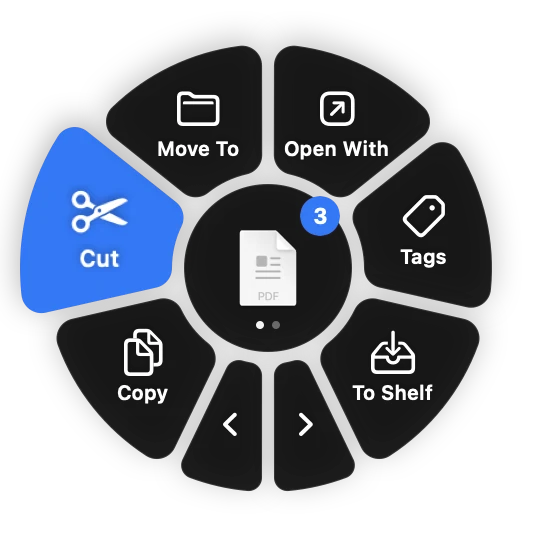
The clipboard wheel around three dragged PDF files, with Cut highlighted

Clipboard Wheel

Drag a few files, tap Control, and let go over what to do with them. Point at the wheel to try it; the arrows turn the page.

Bubbles beside the notch: awake for 45 more minutes, a timer, and music playing

Keep Awake

A cup with a poppy on it counts down beside the notch while your Mac stays up.

A bubble beside the notch showing 94 W coming in

Battery

Plug in and the notch tells you how many watts are really coming in.

One app.
Only what you need.

Install PoppyDesk once and switch modules on whenever you like, in Settings. Nothing to download again, nothing running that you didn't ask for.

Notch
Clipboard Wheel
Menu Bar
Keep Awake
Sound

Stays on your Mac.

No accounts, no analytics, no tracking. What you copy, play and plug in never leaves your Mac.

Read the privacy policy →
✓

Nothing collected

PoppyDesk doesn't send anything about you or how you use it. There's no server to send it to.

✓

Asks only when needed

A permission is asked for the first time you use what needs it, never for modules that are off.

✓

Camera stays yours

The camera turns on only when you click it in the notch, and off when the notch closes. Nothing is recorded.

Installing takes a minute.

PoppyDesk isn't from the App Store yet, so macOS asks you to confirm it once.

Download

Open PoppyDesk.dmg and drag PoppyDesk into Applications.

Open it

Open PoppyDesk from Applications. macOS says it can't check it; click Done.

Allow it

Open System Settings → Privacy & Security, scroll down and click Open Anyway next to PoppyDesk.

Enjoy

Pick your modules. From then on PoppyDesk updates itself, no more asking.

Prefer Terminal? After dragging it to Applications, run xattr -dr com.apple.quarantine /Applications/PoppyDesk.app and open it.

Questions

Is PoppyDesk free?

Yes, every module.

Why does macOS warn about it?

Apps from outside the App Store need to be checked by Apple ("notarized") to open without a question. PoppyDesk isn't yet, so macOS asks you to confirm once. Updates install without asking again.

How does it update?

PoppyDesk checks for a new version once a day and offers to install it in a click. Turn that off, or have updates install on their own, in Settings → About.

Does it work on Macs without a notch?

Yes. Macs without one get a black notch at the top of the screen that works the same way.

Which permissions does it ask for?

Only what the modules you turn on need, the first time you use them: Accessibility to paste and to tidy the menu bar, Calendar to show your events, the camera for the mirror in the notch, audio for the Sound mixer, and Finder to move files you cut. Each is explained before macOS asks.

How do I uninstall it?

Quit it from the poppy in the menu bar and drag PoppyDesk from Applications to the Trash.

Found a bug or have an idea?

Tell me on GitHub, or use Settings → About → Report a Problem in the app, which fills in your versions for you.

Get PoppyDesk

Free, for macOS 14 Sonoma or later, on Apple silicon and Intel.

Download for Mac

What's new